KeyChainino · Software
What is the watchdog and how to use it
Today I want to talk about a particular dog.
Not a normal dog, but a special one who doesn’t need a leash. This dog watches you… and it’s called the watchdog 😀
The watchdog – according to Wikipedia – is an electronic timer that is used to detect and recover from computer malfunctions.
Yep! The watchdog, normally, is used to reset the microcontroller when it gets stuck in a part of the program, for many reasons.
When we enable the watchdog, during normal operation, we need to reset it. Otherwise, when the microcontroller’s sketch – or firmware – is stuck at some point, we can’t reset the watchdog timer and the microcontroller will be reset.
But the watchdog timer can also be used as a timer that wakes up the microcontroller after a certain time, by using its interrupt.
So we can put the microcontroller to sleep, save energy, and then wake it up with the watchdog set to a certain time.
If we use a battery, we can save a lot of power!
For example:
If we want to blink an LED, we usually do this:
void loop() {
  digitalWrite(13, HIGH);   // turn the LED on (HIGH is the voltage level)
  delay(1000);              // wait for a second
  digitalWrite(13, LOW);    // turn the LED off by making the voltage LOW
  delay(1000);              // wait for a second
}
If we are using a battery, when we turn off the LED and then we wait for 1 sec, we only waste energy.
That’s because the LED is off and the microcontroller doesn’t do anything: it only waits and wastes energy.
Take a look at the Datasheet of the Attiny84

What do my eyes see???
When the micro is in active mode – while we wait and the LED is turned off – it consumes 300 uA.
Instead, if we put the microcontroller to sleep – specifically in power-down mode – it only consumes 0.1 uA.
Really 0.1 uA!!!!
So, instead of doing nothing and keeping the micro in active mode, we can put it in sleep and save a lot of energy!
Well, now the question is:
If the micro is in standby, who wakes it up?
Do we need to push some buttons to fire an interrupt?
No. We can use the watchdog timer interrupt to wake up the microcontroller after a certain time!
Now, here’s the code with the sleep mode:
#include <avr/interrupt.h>
#include <avr/sleep.h>
#include <avr/power.h>
#include <avr/wdt.h>

// the setup function runs once when you press reset or power the board
void setup() {
  pinMode(7, OUTPUT);
}

// the loop function runs over and over again forever
void loop() {
  digitalWrite(7, HIGH);   // turn the LED on (HIGH is the voltage level)
  delay(1000);              // wait for a second
  digitalWrite(7, LOW);    // turn the LED off by making the voltage LOW
  waitSleep(1); //go sleep for 1 second
}

void waitSleep(int millisec) {
  while (millisec) {
    goSleep();
    millisec--;
  }
}

void goSleep() {
  watchdogSetup(); //enable watchDog
  power_timer0_disable(); //disable Timer 0
  power_timer1_disable(); //disable Timer 1
  set_sleep_mode(SLEEP_MODE_PWR_DOWN);
  sleep_mode();
  //disable watchdog after sleep
  wdt_disable();
  power_timer0_enable(); //enable Timer 0
  power_timer1_enable(); //enable Timer 1
}

void watchdogSetup() {

  //WDP3 - WDP2 - WPD1 - WDP0 - time
  // 0      0      0      0      16 ms
  // 0      0      0      1      32 ms
  // 0      0      1      0      64 ms
  // 0      0      1      1      0.125 s
  // 0      1      0      0      0.25 s
  // 0      1      0      1      0.5 s
  // 0      1      1      0      1.0 s
  // 0      1      1      1      2.0 s
  // 1      0      0      0      4.0 s
  // 1      0      0      1      8.0 s


  // Reset the watchdog reset flag
  bitClear(MCUSR, WDRF);


 //The following bit have to be set at the same time otherwise the system doesn't set the right value

 /* Start timed equence */
 //Watchdog Change Enable to clear WD (by setting the WDCE bit) and Enable WD (by setting the WDE bit)
 WDTCSR |= (1 << WDCE) | (1 << WDE);

 //Set new watchdog timeout value to 1 second (WDP2 and WDP1 to 1) and enable interrupts instead of reset (WDIE to 1)
 WDTCSR = (1 << WDIE) | (1 << WDP2) | (1 << WDP1);
}
ISR(WDT_vect) {
// Don't do anything here but we must include this
// block of code otherwise the interrupt calls an
// uninitialized interrupt handler.
}
Well, we have created the function waitSleep() where we can indicate how many seconds we want to sleep. We are using this function instead of the delay() function.
The waitSleep() function counts how many seconds we want to sleep. That’s because the watchdog timer can be set to different timings. In this case we have set the watchdog to fire every 1 sec. I’ll explain how to set the watchdog later.
So, every second the waitSleep() function calls the goSleep() function, which sets the watchdog, disables all the unnecessary peripherals and goes to sleep().
When the watchdog timer interrupt wakes up the microcontroller, the code continues after the sleep_mode() function, disables the watchdog and re-enables all the peripherals.
Once the microcontroller has slept for the seconds that we set, the code goes back to turn ON the LED.
Well, but how do we set the watchdog and, more importantly, how do we set its timer value?
We need to read the Datasheet.
I’m sorry, but there isn’t another way! 🙂
So, take a look at the ATtiny84’s datasheet.
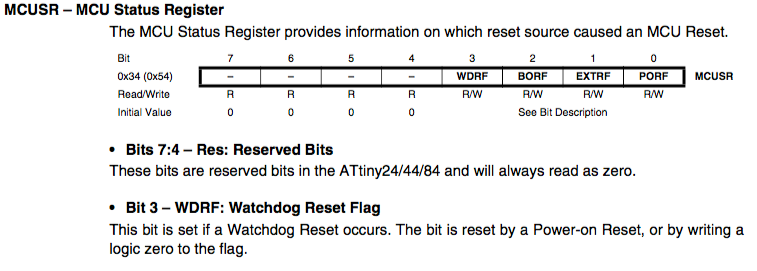
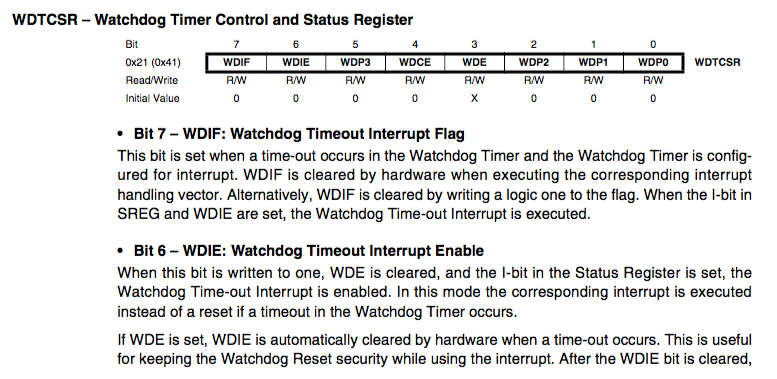
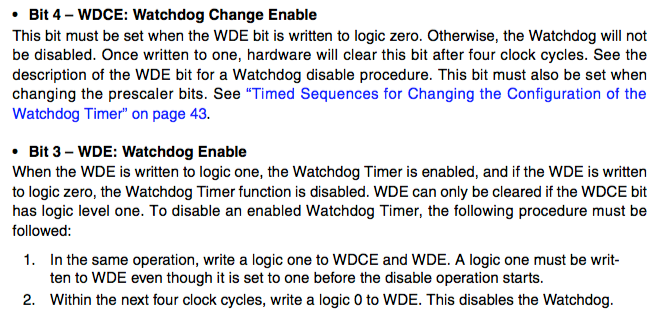
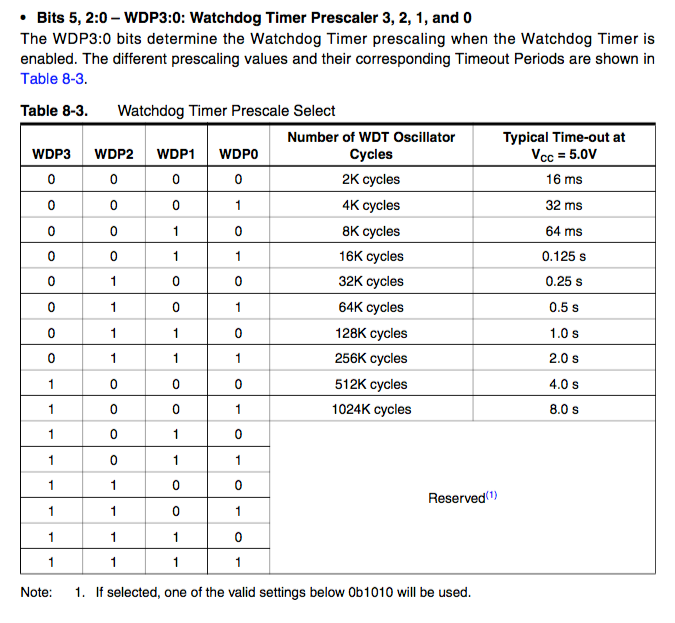
To enable the watchdog we need to set two registers:
The MCU Status register – aka MCUSR – and the Watchdog timer control and status register – aka WDTCSR.
First, in the MCUSR register, we need to reset the WDRF bit that is the flag of the watchdog interrupt. Every time we have a watchdog interrupt, this bit is set to 1 by the microcontroller. So we need to clear it to make the interrupt work again.
Then, in the WDTCSR register, we set the WDCE bit – the watchdog change enable – that clears the WD timer and also lets us change the prescaler value. Next we set the WDE bit to enable the WD. These two settings must be done at the same time.
Now we can set the value of the WD prescaler according to its table. In our case we set the prescaler to 1 sec by setting the WDP2 and WDP1 bits. Finally we set the WDIE bit that enables the watchdog interrupt instead of the reset of the microcontroller. These two settings must be done at the same time.
Remember to add the ISR(WDT_vect) function to your sketch. That’s because the microcontroller needs it to use the WD interrupt.
Well, now we can use the WD to save energy.
I’ve used this hack in KeyChainino. I’ve made a simple KeyChainino Christmas Lamp to hang on your Christmas tree.
In this specific case, KeyChainino wakes up every 4 seconds and displays magical stars 🙂
I have obtained 210uA using this code 🙁 I wonder what I am doing wrong
Are you using the ATtiny84?
Any change you’re porting this to the v144, please?
Hi Steven,
Sure thing. Will do it and let you know once it’s done.
Cheers
Alessandro